Edit the text inside a PDF that already exists.
One API call changes the words and leaves everything else exactly where it was: the fonts the document embeds, the layout, the other 99 % of the page. Every change is verified before it comes back. Built for developers and for AI agents.
curl -sS https://api.niubai.vip/v1/edit -H "Authorization: Bearer sk_live_…" \
  -F file=@invoice.pdf \
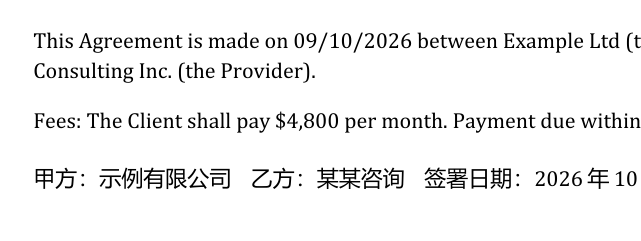
  -F 'edits=[{"find": "$4,200", "replace": "$4,800"}]'
→ status: done · 1 change · font: document's own · collateral pixels: 0
How it works
Three steps, no SDK required. SDKs and an MCP server exist if you want them.
Get a key
Enter an email below. The free plan has 200 pages a month and needs no card.
Send the PDF and the edits
Upload the file or point at a URL, and list what to find and what to put there. Scope by page, region, anchor or occurrence.
Get the verified result
The edited PDF, plus per change: the font used, the pixel check, a before/after preview. A change that cannot be verified is rolled back, not returned.
Real output, not mock-ups
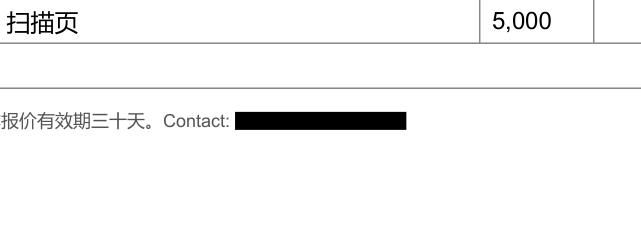
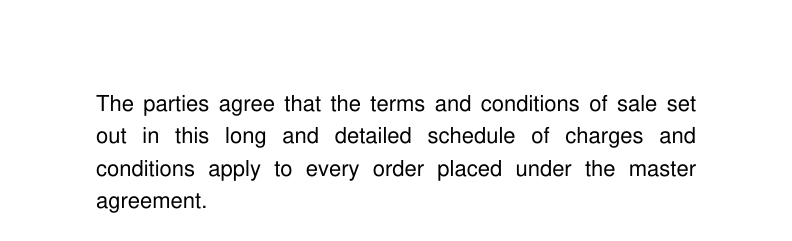
Each pair below was produced by the API itself over a real document. The request that made it is next to it.
{"edits": [{"find": "$4,200", "replace": "$4,800"}]}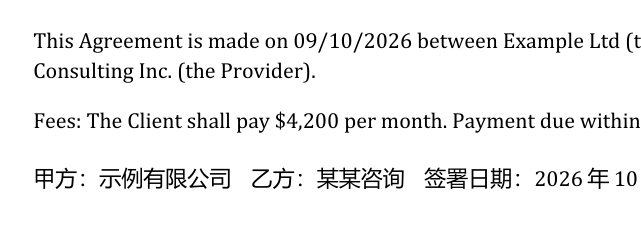
{"edits": [{"op": "redact", "find": "4111 1111 1111 1111"}]}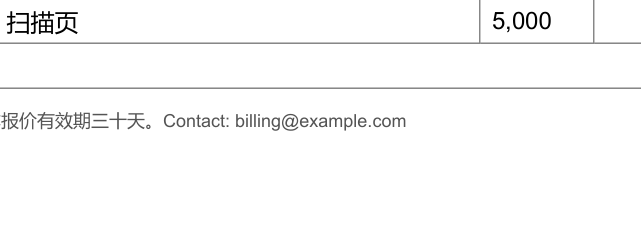
{"edits": [{"find": "…", "replace": "…", "fit": "reflow"}]}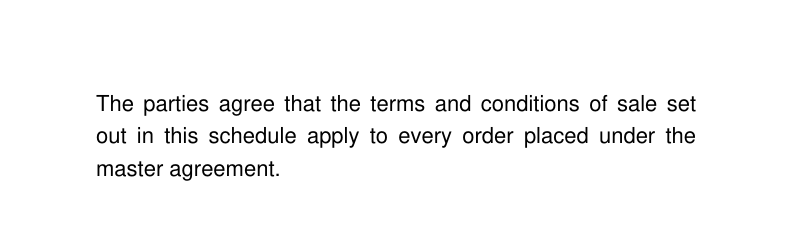
Five operations
Exact, case-insensitive, word and regex matching; OCR for scanned pages; batch mode for one template and many records.
replaceRewrite a phrase in the document's own font. Longer text is fitted, or reflows the paragraph.
deleteRemove a phrase and tidy the punctuation and spacing it leaves behind.
redactRemove text for real: content stream, image pixels, metadata, outlines. Reports anywhere else the string still occurs.
insertAdd text at a point or after an anchor phrase, in the surrounding style.
formFill AcroForm fields by name, read the value back, optionally flatten.
For agents: an MCP server
Claude Code, Cursor and Claude Desktop can edit PDFs through the same API with five tools. Local files are uploaded for you; every tool answers with what changed and a preview.
claude mcp add --env PDFEDIT_API_KEY=sk_live_… pdfedit -- npx -y @niubai/pdfedit-mcpNo key at all? The hosted endpoint answers anonymous callers with 20 pages a day per IP, output watermarked:https://pdfedit-mcp-remote.niubai-pdfedit-remote-worker.workers.dev/mcp
SDKs: npm install @niubai/pdfedit · pip install pdfedit · source and examples at https://github.com/zp130221/pdfedit-mcp.
Pricing
Per page edited. A page is one page of the document an applied edit touched; OCR pages count as five. Prices in USD, tax added at checkout where the buyer's country requires it. Also: a 5,000-page pack for $19, never expires.
Try it
$4.90 once
500 pages, never expire
Pay once, no subscription.
Starter
$19 / month
5,000 pages
Overage $0.005 / page.
Growth
$49 / month
20,000 pages
Watermark control on flagged documents.
Scale
$149 / month
100,000 pages
Highest concurrency and rate limits.
Buy — enter the email for the account. New here? We'll email you a sign-in link for the account page after checkout.
Subscriptions renew monthly and can be cancelled any time from the customer portal link on the receipt; the plan stays until the end of the paid period. Payments are handled by Creem, the merchant of record. See the refund policy.
Get a free key
One account per email. We'll email you a sign-in link; keys are made on your account page.
Questions
What counts as a page?
A page of the document that an applied edit touched. One edit on one page of a 300-page contract costs one page. Pages that needed OCR count as five.
Does it change anything I did not ask for?
It is built not to. Every change is rendered before and after and compared pixel by pixel outside its own area; if anything else on the page moved, the change is rolled back and the API says why. A request with one failing edit returns nothing rather than a document that is subtly wrong.
Which fonts does it use?
The document's own font when enough of it is embedded, a metric-compatible substitute when it is not, an approximation as a last resort. The response tells you which one you got for every change.
What about scans?
Pages without a text layer go through OCR; a replacement on such a page is drawn as pixels and verified by re-rendering. Redaction on a scanned word is refused, because the word is the image.
Where do my documents go?
They are stored only to serve the request and deleted automatically within 24 hours. Job records without document content are kept 30 days for support and billing. Nothing is used for anything else.
Is there a watermark?
Not on an ordinary document, on any plan. A document that looks like an invoice, a contract or a sealed paper is marked "Edited" by default; Growth and Scale accounts that accept the document-integrity terms may turn that off. A redaction is never watermarked.
Terms of service
Service
PDF Edit API ("the service") edits PDF documents you submit through its API and returns the result. It is provided by the independent developer named in the contact section. It is verified change by change, but no particular edit is guaranteed to be possible; an edit the service cannot verify is refused rather than returned.
Your documents
Uploaded and edited documents are stored only to serve the request and are deleted automatically within 24 hours, previews within the same window. Job records without document content are kept for 30 days for support and billing. Documents are never used for anything else.
Acceptable use
You may only edit documents you have the right to alter. Producing a document intended to deceive a third party about its origin or content (a forged invoice, a tampered contract, an altered official record) is prohibited and ends the account without refund. Documents that look like financial, legal or sealed papers are watermarked by default for this reason.
Accounts and billing
One account per email address; you are responsible for the use of your keys. Monthly allowances reset each period; credit packs do not expire. Overage beyond a paid plan's allowance is billed at the listed per-page price. Subscriptions renew until cancelled.
Liability
To the extent permitted by law, liability is limited to the amount you paid for the service in the three months before the claim. The service is provided as is.
Open source
The editing engine is free software under the GNU AGPL-3.0; its complete source is available to every API user at GET https://api.niubai.vip/source with any key. The clients and the MCP server are MIT.
Refund policy
A subscription or credit pack is refunded in full on request within 14 days of purchase if fewer than 100 pages have been used on the account in that time. Write to the contact address from the email on the account. Refunds go back to the original payment method and are processed by Creem, usually within 5 business days. Cancelling a subscription stops future charges and keeps the plan until the end of the paid period.